HiHello: Digital Business Card
- 4.8
- Rating
- 500.00K
- Installs
- Free
- Price
 Analysis by App-foxy
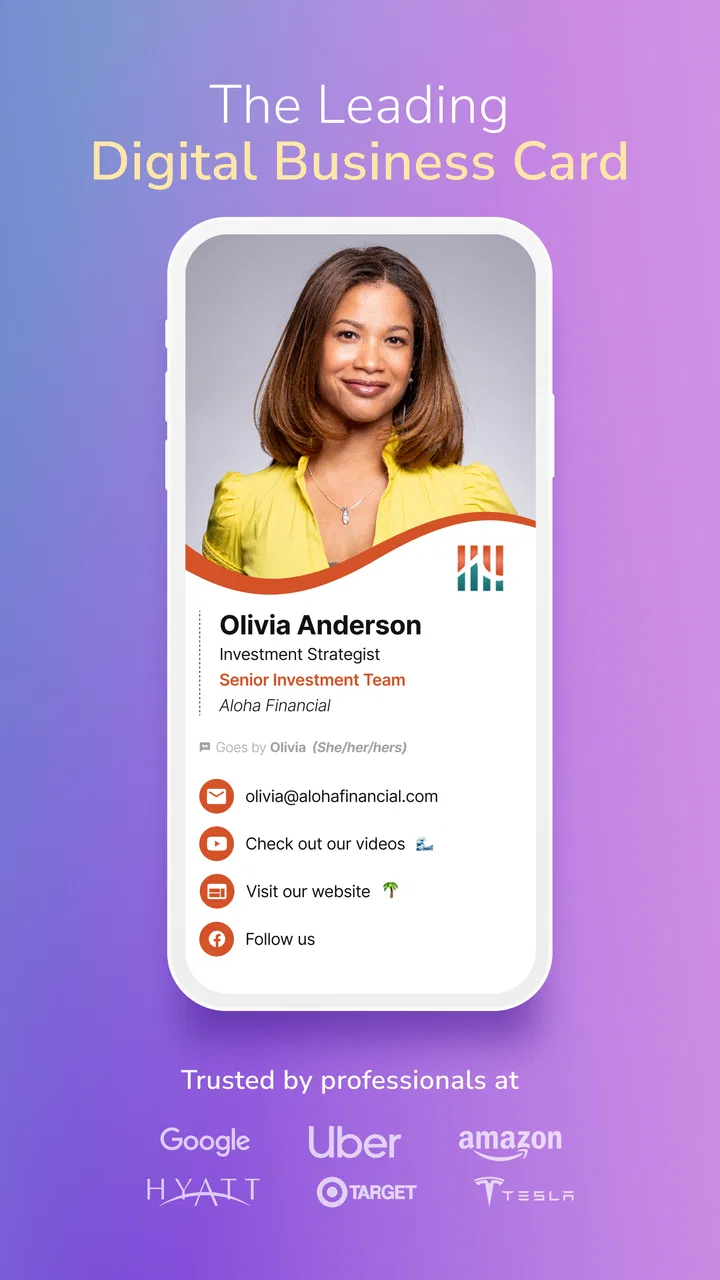
I like business tools that remove a small piece of friction from a busy day, and HiHello: Digital Business Card is built around exactly that idea. Instead of carrying printed cards, I can create a digital identity, share it, keep other people’s details organized, and scan cards I receive. It is a free business app from HiHello Inc, aimed at everyone from independent professionals to teams that want a cleaner way to handle networking.
My first impression is that the app makes the most sense when treated as a contact workflow rather than a decorative card designer. The card itself is only the starting point. The useful part is being able to move from a meeting to a saved contact without relying on a paper card that may disappear into a drawer. That makes the app especially relevant for consultants, salespeople, recruiters, freelancers, event visitors, and anyone who regularly meets new clients.
The app has reached an average rating of 4.8 from around 16 thousand ratings, with more than 500 thousand installs. Those figures suggest that its central idea is resonating with a substantial audience, although popularity alone does not decide whether it fits a particular working style. I would still look closely at how often I exchange contact information and whether my contacts are comfortable receiving a digital card.
You May Also Like

 Blood Strike: 2.5 Anniversary
Blood Strike’s Loadouts Turn Every Drop Into a Tactical Gamble
A close look at Blood Strike’s custom loadouts: how fast access to signature weapons reshapes its battle royale rhythm, rewards preparation, and narrows the gap between fights.

 Pandora - Music & Podcasts
Pandora’s Music Is Easy to Start, but Harder to Recover
Pandora’s strength is its low-effort path from a seed to a station. Its weak spot is how much confidence it asks you to place in connection, setup, and quiet recovery.

 8 Ball Pool
8 Ball Pool Is Built on Rivalries, Rematches, and Routine
A close look at the rivalries, rematches, shared routines, and unanswered safety questions that turn a quick pool match into a persistent mobile community.

 Samsung Music
Samsung Music’s Quiet Strength Is Playing What You Already Own
Its reach comes less from spectacle than from dependable access to a personal library. That simplicity is both the app’s strongest retention engine and its ceiling.

 AccuWeather: Weather Radar
AccuWeather Review: A Quick, Clear Forecast for Everyday Decisions
For everyday plans, the best forecast is the one you can understand quickly. AccuWeather makes rain timing, radar, and local conditions easy to act on, with a few trade-offs.

 Hill Climb Racing
Why Hill Climb Racing Still Turns Crashes Into One More Run
A tiny car, a bumpy hill and one more upgrade: Hill Climb Racing keeps resurfacing because its simple chaos makes every near-miss feel personal.
More From Our News Desk



How HiHello feels during real networking work
I find HiHello most useful when I treat networking as a small workflow to prepare for, not a moment to improvise through. Before an event, I can decide which contact details belong on my card and which follow-up route I want people to use; afterward, I can review new contacts while the conversations are still easy to remember. That preparation makes the next question less about the card itself and more about whether its free starting point is enough for my needs.
Getting a card ready before the first meeting
The best time to use HiHello is before I actually need it. Creating and checking a card in a calm moment is much better than trying to build one while standing beside a registration desk or talking with a potential customer. I would prepare the card with the details I am happy to share publicly, then review the presentation from a recipient’s point of view.
That last check matters because a digital card can contain more information than a printed one. A phone number, email address, job title, company identity, and social profile can quickly become cluttered if they are all treated as equally important. My practical advice is to put the contact route I want people to use most clearly first. A card should help someone act, not make them search.
HiHello is also useful for people whose role changes often. A freelancer may present different information when approaching a design client than when speaking to a potential collaborator. A small business owner may want a customer-facing identity that is separate from a personal networking profile. The ability to keep a digital card current is one of the strongest reasons to choose this format over a stack of printed cards.
Sharing without interrupting the conversation
In a normal meeting, the best sharing method is the one that keeps eye contact and conversation moving. I would not want to pause for a long setup, ask someone to spell an email address, and then manually check every character. A digital card can reduce that exchange, but the experience still depends on the recipient being willing and able to open what I share.
This is an important trade-off. Printed cards work almost everywhere and require no explanation, while a digital card is easier to update and less likely to create waste. If I am meeting someone who prefers paper, has limited connectivity, or does not want another app-related interaction, I would keep a simple backup method available. HiHello is most convincing when both sides are comfortable with digital contact sharing.
I also found that the app encourages a more deliberate approach to follow-up. Rather than collecting cards and hoping I remember the context later, I can treat each new contact as the beginning of a small record: where we met, why the conversation mattered, and what I promised to send. The app’s organizer role becomes more valuable here than the visual card itself.
Scanning cards after an event
Scanning is particularly helpful after a conference, sales visit, or local business event where several people hand over printed cards in quick succession. Instead of typing every name and number immediately, I can use the scanner as the first step in turning paper information into a digital contact. That saves time and reduces the chance of losing a card before I return to my desk.
There is still a human-check step that I would not skip. Printed cards vary widely in layout, font size, abbreviations, and the way they present multiple phone numbers or email addresses. After scanning, I would review the resulting contact before relying on it for an important follow-up. The time saved is real, but automation should not replace a quick verification when the contact is commercially important.
A useful workflow is to scan cards in batches, then organize them while the event is still fresh in my mind. I can separate a promising lead from a casual introduction and add context before the details become vague. This is a less obvious strength: the scanner is not only a convenience tool, but also a way to create a more disciplined post-event routine.
What happens when usage gets heavy
Light use is easy to imagine: create a card, share it once, and move on. The more revealing test is a busy day with repeated sharing, incoming cards, and several follow-ups. In that situation, the value of HiHello depends less on how attractive the card looks and more on whether organizing information remains simple.
I would use a consistent naming habit for contacts and avoid saving duplicates whenever possible. If I scan a card and later receive the same person’s details through another exchange, the organizer can become less useful if I treat every appearance as a completely new contact. A quick review after a busy event helps keep the collection meaningful rather than turning it into an untidy archive.
For teams, the question is not just whether one person can make a card. The more important issue is whether everyone can present accurate, current information and maintain a professional experience when roles or contact details change. HiHello is attractive for that kind of coordinated identity, but a team should agree on naming, branding, and update habits before rolling it into regular networking.
I would also avoid making the app the sole location for critical information. Any digital organizer becomes less helpful when it is used as an excuse not to maintain a broader contact process. For important leads, I would still move the relevant details into the customer or project system my work already depends on. HiHello can be the fast capture point, while a dedicated business system remains the long-term record.
Stability, recovery, and everyday confidence
For a business card app, reliability is not only about whether the interface opens. The real question is whether I can confidently use it at the exact moment a conversation matters. A card that is prepared in advance is less exposed to last-minute problems than one created during a meeting, so preparation is part of dependable use.
I would also make a habit of checking the card before an important event, especially after changing a phone number, job title, or company detail. A digital card’s great advantage is that updates are easier than reprinting, but that advantage only helps if I remember to make the update and confirm that the current version is the one I intend to share.
Recovery is another reason not to rely on a single workflow. If a device is unavailable, a meeting changes direction, or a recipient cannot use the expected sharing route, I should still be able to explain my contact details clearly or provide a conventional alternative. HiHello reduces friction; it does not eliminate the need for basic professional preparedness.
The current version is 7.4.4, and the app runs on Android 7.0 or later. That broad operating-system range is useful for people who keep older phones in service, although users on older hardware should set realistic expectations. A business app may be perfectly usable on an older device while still feeling less fluid when the phone is already crowded with other work tools.
Resource demands and device limitations
I would not choose HiHello because I expect it to replace a full customer relationship platform. Its focused purpose is an advantage on a phone, but it also defines the limits of the experience. People who need detailed pipelines, advanced reporting, complex account permissions, or a deep sales database may be better served by a dedicated business system.
Likewise, someone who exchanges contact information only a few times a year may find a digital card app unnecessary. A simple email signature or a traditional printed card could be enough for that person. HiHello becomes more compelling when contact exchange is frequent and the cost of manually typing, storing, and updating details starts to become noticeable.
On an older phone, I would keep the workflow lean: prepare the card before leaving, close unrelated apps if the device is already struggling, and avoid experimenting with the setup in front of a client. I am not presenting those steps as measured performance results; they are sensible habits for any mobile business tool used during time-sensitive conversations.
The app is free to start, which lowers the barrier for an individual user who wants to test the concept. In-app purchases range from $8.99 to $129.99 per item, so anyone considering it for broader professional use should examine which paid capabilities match their actual workflow before committing. I would begin with the free experience, use it through a few real networking situations, and only then decide whether additional spending is justified.
Who gets the most from it
HiHello is a strong match for people who frequently update their professional identity or meet contacts in changing settings. A contractor moving between projects, a recruiter attending hiring events, and a salesperson visiting several businesses can all benefit from avoiding repeated manual entry. The scanner is particularly useful for people who still receive many physical cards but want their follow-up process to be digital.
It is also a sensible option for a small team that wants a consistent way to share contact information without constantly ordering new printed materials. The team should be comfortable managing updates, though. A digital card is only professional if the information remains accurate, and a shared process is more important than simply giving everyone access to the same app.
I would be more cautious if my work depends on formal contact records, strict internal workflows, or detailed customer histories. In those cases, HiHello may be a convenient front door but not the complete solution. I would also hesitate to recommend it as the only method for people who regularly work with audiences that prefer paper or have limited access to digital tools.
Compared with printed cards and ordinary contact apps
Printed cards win on universality. They are immediate, familiar, and easy to hand over without asking someone to interact with a digital system. Their weakness is that they become outdated, are easy to misplace, and force the recipient to type information manually. HiHello reverses that balance: it is easier to update and organize, but it asks both people to accept a digital exchange.
A normal phone contacts app is excellent for storing people I already know, but it does not necessarily provide the same presentation and sharing workflow. HiHello sits between a contact book and a professional identity tool. That makes it more purposeful for networking, while a standard contacts app may remain better for personal relationships or contacts that do not need a business-facing profile.
Email signatures are another practical alternative. They work well when the conversation already happens by email and the recipient is likely to save the sender naturally. HiHello is more useful in person, where I want to pass along a complete professional identity without dictating every detail. The right choice depends on where my networking actually happens, not on which option has the longest feature list.
My performance verdict
After looking at the full workflow, I see HiHello as a focused business utility rather than an app I would keep open all day. Its perceived speed comes from reducing repeated typing and making the exchange more structured. Its strongest performance moment is not a flashy screen transition; it is the time saved when a contact can be shared or captured without rebuilding the information manually.
Its reliability also depends on preparation. I would create the card before an event, check the details after any professional change, review scanned contacts, and keep a fallback for people who prefer traditional exchanges. Those habits make the app feel dependable because they address the real points of failure around networking, not just the app itself.
The Everyone age rating makes it broadly approachable, and the free entry point is helpful for testing it without an immediate commitment. Still, the paid range means heavier users should evaluate the value of extra capabilities against their actual number of contacts and events. For occasional networking, the basic approach may be enough; for teams and frequent exchangers, the investment deserves a closer look.
My final recommendation is straightforward: I would suggest HiHello to a friend who regularly meets clients, collects business cards, or needs a professional identity that can change without reprinting anything. I would not insist on it for someone with rare networking needs or a highly specialized customer-management system. The app is at its best when it turns a repeated, messy exchange into a prepared and reviewable routine. That is a practical benefit, and for the right kind of professional, it is more valuable than simply having a digital card that looks modern.
FAQs for HiHello: Digital Business Card
01What is HiHello: Digital Business Card, and how does it work?
HiHello is a digital business card app that lets you create, customize, and share professional contact information from your phone. Instead of printing paper cards, you can send your profile through a link, QR code, email, text message, or compatible sharing method. Recipients can view your details in a browser, even if they do not have the app installed.
02Can I create more than one digital business card in HiHello?
Yes, HiHello is designed to support different professional identities and networking situations. You can create separate cards for different roles, companies, or purposes, such as a personal profile, freelance business, or event-specific card. Each card can contain its own contact details, job title, social links, profile photo, and other information, making it easier to share the most relevant version.
03How can I share my HiHello digital business card with someone?
HiHello provides several sharing options, which makes it useful during both in-person and remote networking. You can show your QR code for someone to scan, send your card as a link, share it through messaging or email, or use other supported contact-sharing options on your device. The recipient generally opens the card in a web browser without needing to download HiHello.
04Is HiHello useful for tracking contacts and networking activity?
Beyond replacing a paper business card, HiHello can help organize the people you meet and manage your professional connections. Depending on the plan and features available to your account, you may be able to save contacts, update your card centrally, and review engagement or sharing activity. Users should check the current subscription details because advanced contact-management and analytics tools may not be included in every plan.
05Is HiHello: Digital Business Card free to use, and is my information private?
HiHello offers access to core digital business card features, but some advanced tools, customization options, team functions, or analytics may require a paid plan or subscription. Before downloading, review the current pricing and trial terms in the app store. You should also examine the privacy policy and sharing settings, since the information on your card is intended to be visible to people who receive or scan it.
Pros
- Easy way to share contact details without printing paper cards.
- Profiles can be updated without replacing previously shared information.
- QR code sharing makes exchanging details quick during meetings.
- Supports a more sustainable alternative to traditional business cards.
- Useful for networking at events
- conferences
- and client meetings.
Cons
- Some features may require a paid subscription or premium plan.
- Recipients may need internet access to view the digital profile.
- Not everyone is familiar with digital business cards yet.
- A polished profile requires time to enter and organize your details.
- Privacy depends on how much personal information you choose to publish.

HiHello: Digital Business Card
Gallery